Hey!
I'm back. I haven't been participating with FIF for quite some time...Because...I find browsing at professional's work is much more fun than using all the skills I can muster to get something that comes out lowly next to their work, which is marvelous...(I LOVE those words...hehe!)
Normally, friends, I use the original and then one creative edit...Or the one that turned out the least bad. =) But today, the subject was so gorgeous and fun to work on that I had a hard time closing my GIMP. I saw it and I thought, 'Hey, I'll just fiddle with the contrast, sharpen a bit and then voila,'
But no...I became addicted. * creepy music * Ever so slowly...And I couldn't get myself to close it down.. I will warn you. Instead of two pictures today, I have...I think...*calculates* 8 Fixits. So, sit tight and buckle up 'cause this is all about the pictures I fixed and how I fixed them.
NOTE: They are not in order...Because I couldn't remember just what number was which so I just threw them on here...=)
Here is the beautiful cheerleader we were given to edit. Ain't she purdy? =)
Yup, you guessed it. She's invisible...Now you see why we had such a rough time fixi--I'm kidding =P . But Blogger won't let me bring them all up, so...Just scroll down. Have patience. =)
There we go. Here she is! OOH-RAH! No, wait...That's the Marines...But Daddy was a marine...Mom was a cheerleader...OOH-RAH and...BOOM-BAH!? I forget what the cheer is...:D
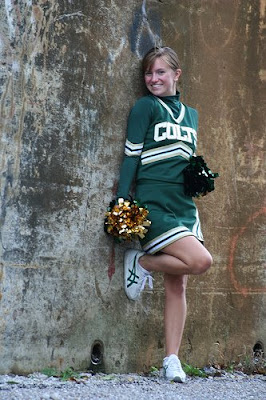
The senior, so blurry and bland...Poor dear...There is not a hint of color..I'd die in a world without color...And if I couldn't edit my photos I don't know WHAT I'd do. AHEM. Anyway...
1.

So, for this I did what any person would do. I immediately headed for 'brightness and contrast'. I moved the noggle around...(I don't think that's right...Noddle? What is that wo--NOZZLE! There we go. Like the hose...=) I fiddled around with that, then sharpened at 49.
2.
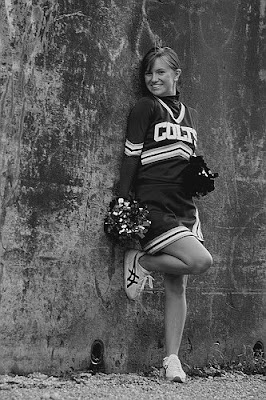
I wanted to be original and try something I hadn't seen yet. Then I got doubts...:| Maybe the pros didn't put it to black and white because it doesn't look good? But I went for it. I adjusted the hue and saturation until it got to the clean black and white look and sharpened at 49 again. I like how it turned out...=)
3.
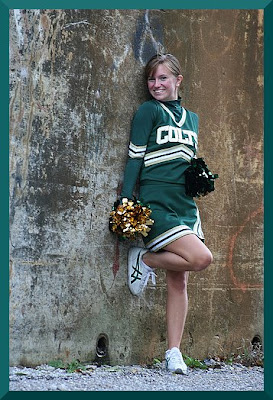
Everyone else was doing borders and I felt left out!! =( I grabbed the contrast thingy and moved it over about an inch, then I hardlighted it with the opacity to about...12.4? I'll say that. If I'm wrong, you can throw a shoe at me. =) I sharpened it to 49, used the eyedrop to steal the color from her skirt and used that color with the border...=)
4.
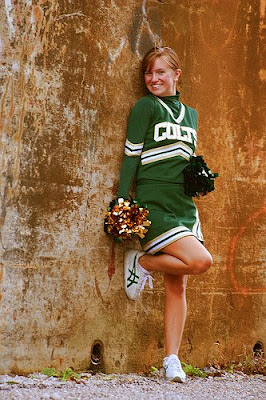
I wanted something sunny. After all the bland, but pretty, black and whites and greys and such, I wanted to bring out some color because I'm color's number one fan. I love pictures that POP. =) I went to the hue saturation and set the yellow over waaaaaaay to the end...To adjust the yellows in the picture. I did this actually on accident...Yay for accidents! I lassoed her to keep her just how she was, but brought out some tan in her legs that was already there...Lucky. >=/ Anyways, I sharpened at 49 to make it crisp.
5.
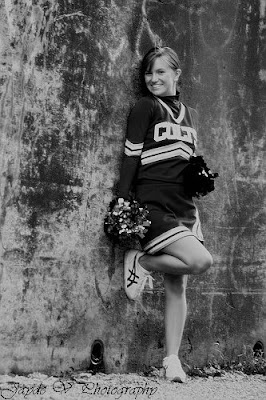
Again, I tried to soften the black and white to make it look vintage...y. I set the hues to B&W, and used the GIMP feature Softglow but...I did something wrong and her cheeks and everything got extremely blurry and icky, so I canceled that session and put the radius way down to 1.8, because it was nuts. I didn't like it...She looked like the fog monster or something. =D I finally got it how I wanted it, sharpened the grass and wall behind her and added my text signature with Vivaldi Script, size 26.
6.
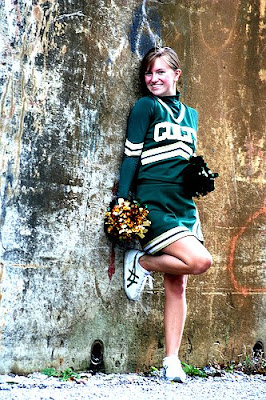
I was in love with sunny by this time...I worked off of the first sunny picture and made it brighter, crisper and even MORE sunny! :) I sharpened at 50, this time, just to change it a bit.
7.
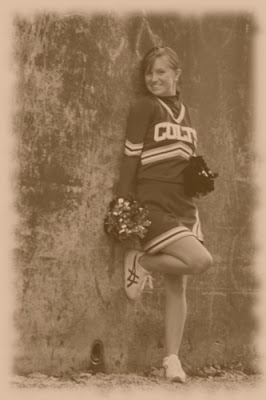
One of my favorite things to do, is my one natural GIMPskill I do my own vintage photos. I went and dulled the colors and blurred the edges, dodged the edges so it looks like something my grandmother would pull out of a hat-box. That's what I wanted it to be like. I imagined sitting with my grandmother at the table and her pulling out high school and senior pictures and saying things like, 'see, when i was your age...' and such. :) I did a Gaussian blur in the middle and sharpened at 23.
8.
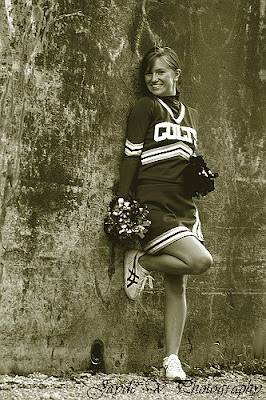
I brought the hue to sepia, but made some green go in there...Almost like a camouflagey green. I didn't like that, so I darkened it with the Burn tool. And then I liked it. And all was good. I added my little signature and sharpened at 49.
To all of you who are considering GIMP, quit arguing with yourself like Smeagul and get it! It works wonders for those of us who can't get Photoshop. Me? I live in Paraguay. I absolutely CAN'T. But for others, well...Yeah. Seriously, though. It's a wonderful mini-Photoshop. Easy to download and I love talking and tutoring on it! :D But I'm no pro, as you can probably see...But I love it and I understand it, things just don't turn out so wonderful sometimes...But thank you, Amy and Angie, this was a BLAST!